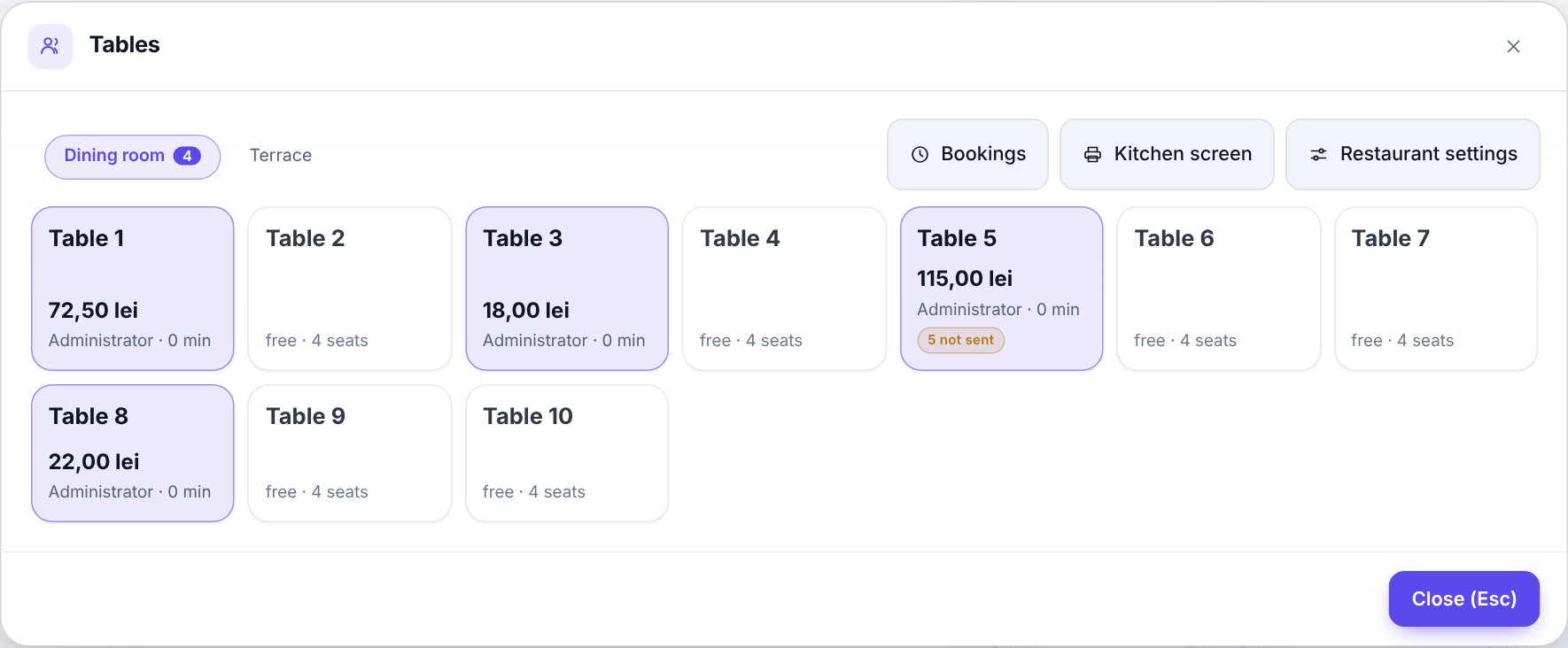
The order at the table, from the waiter to the kitchen
Tables are arranged in areas: dining room, terrace, private room. The waiter opens the table, adds the products to the order, with notes for the kitchen, and presses Send. Only the new lines go, each to its own preparation place.
The preparation places are Kitchen and Bar, and if you need more you add others, such as Pizza oven or Desserts. Every department goes to its own place: food to the kitchen, drinks to the bar. Each place has its own ticket printer (network ESC/POS) and its own screen. If a printer does not respond, the order still reaches the screen.
The kitchen screen instead of paper tickets
On a tablet or touch monitor in the kitchen, orders appear as they come in, with the table, the waiter and the minutes since they arrived. The order card changes colour when it runs late, so the cook can see what is urgent.
A line that is tapped means ready, and the Ready button closes the whole order. The screen and the printer can work together: the paper ticket for the cook, the screen for the head chef.
Menus with options and sizes
A product can have option groups: the daily menu with a choice of soup, the burger with a compulsory drink, a choice of side dish or extra sauces. For each group you choose how many options are compulsory and the most that can be taken.
Every option is an item in the product list, with its own VAT rate: on the fiscal receipt it appears as a separate line, at the menu price, and it is the option that is taken out of stock. Products can also have sizes, for example a 30 or 40 cm pizza, a small or large coffee, each with its own price.
A QR code menu on every table
Every table has its own QR code, printed on A4. The customer scans it and sees the menu on the phone, with photos, prices, portion size and allergens, then sends the order. The waiter confirms it at the till and it goes to the kitchen.
A product that has run out appears grey on the phone, marked “Currently unavailable”, with no add button. The menu changes within seconds, without reprinting anything.
The bill, split bills and tips on the receipt
The bill is printed at the table. If the customers pay separately, the bill is split by product, and each one pays their share at the till, with a fiscal receipt, in cash or by card.
The tip goes on the fiscal receipt as a separate item, without VAT, as the law requires for restaurants, bars and cafés. On the bill the customer chooses 5%, 10%, 15% or another amount, and the program keeps a record of tips for each employee, for the accountant.
Reservations kept on the till
Reservations are entered in the program: the name, phone, day and time, number of guests, the table and a note (birthday, child seat). A strip shows how many reservations there are, and for how many guests, over the next 14 days.
The till refuses two overlapping reservations on the same table. A few hours before, the reserved table shows who is coming and when, and when the guests arrive, Arrived opens the table. A guest who does not show up is marked No-show.
Recipes, portion cost and ingredient stock
With Recipes, selling a dish takes its ingredients out of stock, including those in semi-finished products (sauces, bases). The portion cost is recalculated after every goods receipt, so the markup on the dish is the real one.
The dish's technical sheet has the portion size and the allergens. A dish whose ingredient has run out can be taken off sale automatically, with the reason shown: “missing: Bun”.
Deliveries and orders from Glovo, Wolt and Bolt Food
Orders from Glovo, Wolt and Bolt Food come into the program by themselves, are accepted automatically and go to the kitchen, and the status is sent back to the platform. No more retyping orders from the platforms' tablets.
For your own deliveries: the customer is found by phone number, with their address, you choose the driver and the promised time, and the delivery slip is printed with the delivery fee.
Staff time clock
Every employee clocks in and out on the till with their own code and PIN. Cooks and kitchen helpers get the “Employee - time clock only” role: they clock in but cannot open the till. The manager sees who is at work now, the hours for each employee and the monthly attendance sheet.
A forgotten clock-out is corrected by the administrator, with a trace in the log. The time clock works with every profile, with no separate module.
Which venues it suits
Restaurants, bistros, cafés, bars and pubs, pizzerias, terraces and pastry shops. For quick-service venues with counter service, see the fast-food software page, with numbered orders and a self-service kiosk.